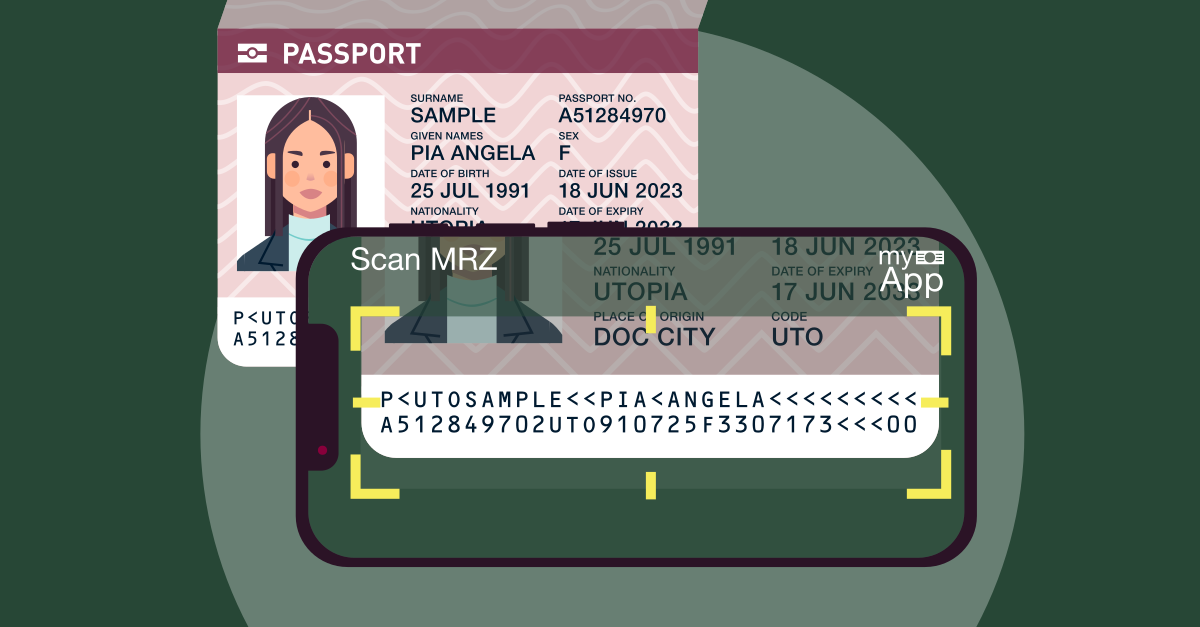
A passport can look genuine while hiding altered details, forged credentials or stolen identities. Visual inspection alone cannot catch every threat. Document authentication goes deeper, combining machine-readable data, electronic security features and biometric checks to identify suspicious documents before onboarding.
According to the International Civil Aviation Organization (ICAO), over 1 billion ePassports are in circulation worldwide. As electronic passports become widespread, nfc passport verification helps businesses access chip data and validate its authenticity, strengthening identity verification and fraud prevention.
But how do these technologies work together? An mrz check validates encoded passport details, while epassport nfc enables chip reading and cryptographic authentication. This guide explores how each technology works, its security benefits and how businesses can use them to strengthen digital KYC.
Binderr Document Authentication & KYC Software
Looking for smarter document authentication software? Binderr combines AI-powered identity document verification, OCR data extraction, biometric matching and fraud detection to streamline customer onboarding. Move beyond manual passport checks with automated identity verification designed for global KYC workflows.
- AI-Powered Document Authentication for identity checks
- 11,000+ Supported ID Types worldwide
- Advanced OCR Data Extraction for passports and IDs
- Biometric Facial Matching for identity confirmation
- Liveness and Deepfake Detection for fraud prevention
- Real-Time KYC Verification for faster onboarding
What Is Document Authentication?
Document authentication verifies whether an identity document is genuine, valid and unaltered. An MRZ check validates passport details, while NFC passport verification uses ePassport NFC technology to read chip data and verify authenticity. Combined with biometric checks, these technologies help detect document fraud, confirm identities and strengthen KYC onboarding.
Verify Identities with Confidence
What Is MRZ (Machine Readable Zone) in Document Authentication?
A Machine Readable Zone (MRZ) is a standardized section of passports and certain identity documents containing encoded personal and document details. It typically appears as two or three lines of letters, numbers and symbols. In document authentication, MRZ scanning helps extract identity information, validate data consistency and detect potential errors or tampering during KYC verification.
What Information Does an MRZ Contain?
An MRZ contains essential information used to identify the document and its holder. Depending on the document format, it includes the document type, issuing country, full name, passport number, nationality, date of birth, sex and expiration date. These standardized fields enable automated identity checks and help businesses compare encoded information with visually printed details.
How Does MRZ Scanning Work?
MRZ scanning begins when a camera captures the machine-readable section of a passport or identity document. Optical Character Recognition (OCR) extracts the characters, while verification software identifies data fields, checks formatting and validates check digits. An MRZ check helps identify reading errors and inconsistent information before further identity verification or NFC passport verification.
How Does MRZ Verification Help Detect Document Fraud?
MRZ verification helps detect potential document fraud by identifying invalid check digits, incorrect formatting and mismatches between printed and machine-readable information. These inconsistencies may indicate document tampering, forgery or scanning errors.
However, a successful MRZ check does not guarantee authenticity, as counterfeit documents can contain valid check digits. Combining MRZ scanning with ePassport NFC chip authentication and biometric verification provides stronger fraud detection during digital KYC.
Run Your First KYC Check
What Is NFC Chip Verification in Document Authentication?
NFC chip verification uses Near Field Communication technology to securely read electronic data stored in passports and compatible identity documents. During document authentication, NFC-enabled smartphones or readers communicate with embedded contactless chips to retrieve identity information and support authenticity checks.
Unlike a basic MRZ check, NFC passport verification can help confirm whether electronic passport data has been altered or forged through cryptographic validation.
How Does NFC Chip Reading Work?
NFC chip reading begins when a passport is placed near a compatible smartphone or NFC reader. The device establishes short-range communication with the embedded chip and uses access-control mechanisms, often involving MRZ information, to retrieve permitted data. ePassport NFC technology enables secure data extraction, while additional cryptographic checks help verify the integrity and authenticity of the retrieved information.
What Information Can NFC Passport Reading Access?
NFC passport verification can retrieve electronically stored identity details, including the passport holder's name, nationality, date of birth, passport number, expiration date and digital facial photograph.
Some ePassports also contain additional biometric information, such as fingerprints, which requires stronger access authorization. This information helps businesses compare chip records with printed passport details and biometric verification results.
How Does NFC Chip Verification Prevent Document Fraud?
NFC chip verification helps detect forged or altered passports by comparing printed details with electronically stored information and validating digital signatures from trusted issuing authorities. During document authentication, passive authentication checks whether chip data has been modified, while supported active or chip authentication mechanisms help detect cloning.
However, simply reading an NFC chip does not prove authenticity. NFC passport verification must include cryptographic validation to establish that the electronic data is genuine and trustworthy.
Make Identity Verification Simple
What Is ePassport Reading and Authentication?
ePassport reading and authentication is the process of accessing and verifying electronic identity information stored in a passport's embedded contactless chip. Unlike traditional passports, ePassports contain digitally signed data, including personal details and a facial photograph.
Through ePassport NFC technology, businesses can retrieve chip information, perform cryptographic checks and compare it with printed passport details. Combined with an MRZ check, this strengthens document authentication and helps detect forged or altered passports during digital KYC.
How Does ePassport Reading Work?
ePassport reading uses NFC-enabled devices to communicate with the passport's embedded chip and securely retrieve stored information. During NFC passport verification, the system checks digital signatures, validates certificate trust and compares electronic records against the physical document to identify potential inconsistencies.
The process typically involves:
- Chip Access: Establish secure communication with the passport's NFC chip.
- Data Extraction: Retrieve stored personal details and facial images.
- Digital Signature Verification: Check whether electronic data has been modified.
- Certificate Validation: Confirm signatures against trusted issuing-authority certificates.
- Document Comparison: Match chip information with printed details and MRZ records.
- Authentication Results: Flag suspicious inconsistencies for further review.
What Is Passive Authentication in ePassports?
Passive Authentication (PA) is a cryptographic security check used to verify the authenticity and integrity of information stored on an ePassport chip. It validates the document's digital signature using certificates linked to the issuing country's trusted authority.
Successful verification confirms that the signed data originates from the recognized issuer and has not been altered, making passive authentication an essential component of secure document authentication.
What Are Active Authentication and Chip Authentication?
Active Authentication (AA) and Chip Authentication (CA) are additional ePassport security mechanisms designed to help detect cloned electronic chips. While passive authentication confirms data integrity, these mechanisms use cryptographic techniques to establish that the chip possesses the required private key. When supported, they strengthen NFC passport verification by helping distinguish genuine chips from unauthorized copies.
What Is the ICAO Public Key Directory (PKD)?
The ICAO Public Key Directory (PKD) is a centralized international platform that facilitates the exchange of digital certificates and related security information used to authenticate electronic travel documents.
Managed by the International Civil Aviation Organization, it helps verification systems obtain the trusted public-key information needed to validate ePassport signatures. This supports reliable ePassport NFC authentication across different issuing countries.
Access KYC Tools Today
MRZ vs NFC Chip vs ePassport Reading: Key Differences
While all three technologies support document authentication, they differ in how they extract, verify and protect passport information. An MRZ check validates encoded details, NFC passport verification enables electronic chip reading, and ePassport NFC authentication adds cryptographic security checks.
Here's a quick comparison of their key features, verification methods and fraud detection capabilities.
Feature | MRZ Scanning | NFC Chip Reading | ePassport Authentication |
Primary function | Extract encoded printed data | Read electronic chip data | Validate electronic passport data |
Technology | Optical scanning and OCR | Contactless RF communication | NFC plus cryptographic validation |
Requires a chip | No | Yes | Yes |
Basic data consistency checks | Yes | Possible | Yes |
Digital signature verification | No | Not inherently | Yes |
Anti-cloning checks | No | Not inherently | Where supported |
Common use | Passport data extraction | Electronic document reading | Higher-assurance passport verification |
Important distinction: NFC is a communication technology, not a separate document standard. ePassport authentication commonly uses NFC-compatible contactless reading together with cryptographic verification.
Automate Customer Verification
How Does Document Authentication Work? Step-by-Step Process
Document authentication involves multiple verification stages to confirm whether an identity document is genuine, valid and belongs to the person presenting it.
From an initial MRZ check to NFC passport verification and biometric matching, each step helps detect suspicious documents and strengthen KYC onboarding.
Step 1: Capture the Identity Document
The process begins when a customer uploads a photo or scans their passport, national ID card or driving licence through a digital verification platform. The system captures the document's visible details, including the photograph, personal information and security features.
Automated quality checks assess image clarity, lighting, alignment and completeness. Blurry images, reflections or missing edges may trigger a request for another scan, helping ensure accurate document authentication during subsequent verification stages.
Step 2: Identify Document Type
Once captured, the system identifies the document category, issuing country and format. AI-powered recognition can distinguish passports, national identity cards and driving licences based on their layouts, visible security elements and standardized features.
This classification determines which verification methods apply. For example, passports may support an MRZ check, while compatible electronic documents can undergo NFC passport verification for additional authenticity checks.
Step 3: Extract MRZ Information
For documents containing a Machine Readable Zone (MRZ), Optical Character Recognition (OCR) technology reads the standardized characters printed on the document. These typically contain details such as the holder's name, nationality, document number, date of birth and expiration date.
The extracted information is converted into structured digital fields for automated validation. Accurate MRZ extraction also supports ePassport NFC workflows because certain chip access mechanisms use information derived from the machine-readable zone.
Step 4: Validate Document Data
After extracting the information, the system checks whether document details follow the expected format. An MRZ check validates check digits, dates and encoded fields while comparing machine-readable information with visually printed details.
Any discrepancies, expired credentials or unexpected formatting may trigger additional review. These checks help identify potential tampering and data-entry errors, although valid MRZ information alone cannot establish that a document is authentic.
Step 5: Read the NFC Chip
If the passport contains a supported contactless chip, the customer places it near an NFC-enabled smartphone or compatible reader. The device establishes short-range communication and uses the appropriate access-control protocol to retrieve permitted electronic information.
During NFC passport verification, the system can access electronically stored personal details and a digital facial image. This provides additional identity data that can be compared against the document's printed information and subsequent biometric checks.
Step 6: Authenticate Electronic Data
Once the chip information is retrieved, the verification system checks its cryptographic authenticity. Passive authentication validates digital signatures and the certificate trust chain to determine whether the signed data originates from a trusted issuing authority and remains unchanged.
Where supported, active authentication or chip authentication adds protection against cloned chips. These ePassport NFC security checks strengthen document authentication by providing evidence beyond visual inspection or MRZ validation.
Step 7: Perform Biometric Verification
The next stage verifies whether the person presenting the document matches its legitimate holder. The customer captures a live selfie or short facial video, which biometric software compares against the passport photograph or authenticated chip image.
Facial matching and liveness detection help identify impersonation, presentation attacks and certain digital manipulation attempts. Combining biometric checks with NFC passport verification provides stronger identity assurance during remote KYC onboarding.
Step 8: Review Results and Assign Risk
The final stage combines document authenticity results, MRZ validation, chip authentication and biometric matching into a consolidated verification outcome. Automated rules can flag expired documents, inconsistent information, failed security checks or suspicious biometric results.
Based on these findings, the system may approve verification, request additional evidence or escalate the case for manual review. Compliance teams can then assign customer risk levels, trigger enhanced due diligence where appropriate and maintain audit records to support ongoing KYC compliance.
Automate the Document Authentication Process with Binderr
From document capture to final approval, Binderr simplifies identity verification through automated OCR, document checks, biometric matching and intelligent risk assessment. Reduce repetitive manual work, flag suspicious identities and keep verification results organized within a single compliance workspace.
- Automated Document Data Capture with OCR
- AI-Powered Identity Verification across global documents
- Biometric Face Matching against document photographs
- Advanced Liveness Detection for spoofing prevention
- Dynamic Customer Risk Scoring for suspicious cases
- Centralized Verification Records for compliance reviews
How MRZ, NFC and ePassport Authentication Help Detect Identity Fraud
Identity fraud goes beyond fake passports. Criminals can alter personal details, clone electronic chips, use stolen documents or manipulate digital verification systems.
Document authentication combines an MRZ check, NFC passport verification and ePassport NFC security checks to identify suspicious information, verify document integrity and reduce identity fraud risks.
Forged and Counterfeit Identity Documents
Counterfeit passports often imitate genuine document designs, security features and personal information to bypass identity checks. However, inconsistencies in document layouts, machine-readable data or electronic signatures can expose these attempts.
An MRZ check identifies invalid formatting and incorrect check digits, while NFC passport verification can validate digitally signed chip data against trusted issuing authorities. Together, these checks help businesses detect forged documents before approving customer onboarding.
Altered Passport Information
Fraudsters may modify passport photographs, names, birth dates or expiration dates to conceal identities or impersonate legitimate document holders. Even minor alterations can create inconsistencies between printed information and electronically stored records.
Document authentication compares visible passport details with MRZ information and authenticated chip data. Through ePassport NFC verification, businesses can identify mismatches that suggest tampering, helping prevent fraudulent identities from entering KYC workflows.
Cloned or Manipulated ePassport Chips
Electronic passport chips store digitally signed identity information, but criminals may attempt to copy chip data onto unauthorized devices or manipulate electronic records. A copied chip containing valid data can create additional challenges for basic verification systems.
NFC passport verification uses passive authentication to detect unauthorized changes to signed data. Where supported, active authentication and chip authentication provide additional anti-cloning protection, helping distinguish genuine chips from fraudulent copies during document authentication.
Stolen Passports and Identity Impersonation
A genuine passport can still be used fraudulently if it has been stolen or belongs to another individual. In such cases, document authenticity checks alone may succeed because the passport itself has not been altered.
Combining an MRZ check and ePassport NFC authentication with biometric facial matching and liveness detection helps verify whether the person presenting the passport matches its legitimate holder. Relevant lost-or-stolen document checks can provide an additional layer of protection against identity misuse.
Digital Injection and Deepfake Attacks
Fraudsters increasingly use synthetic facial images, manipulated videos and digital injection techniques to deceive remote identity verification systems. These attacks may bypass basic selfie checks or introduce fabricated identity data into onboarding workflows.
Advanced document authentication combines passport security checks with biometric liveness detection, facial matching and capture-integrity controls. While NFC passport verification helps establish the authenticity of electronic document data, anti-injection and deepfake detection tools help identify manipulated biometric submissions, strengthening fraud prevention during digital KYC.
Get Advanced Identity Fraud Detection & Document Verification with Binderr
Fraudsters use forged documents, stolen identities, manipulated selfies and deepfakes to bypass digital onboarding.
Binderr strengthens document authentication with AI-powered identity checks, biometric verification and liveness detection, helping compliance teams identify suspicious submissions before approving customers.
- AI-Powered Document Fraud Detection for suspicious submissions
- Biometric Facial Verification for identity matching
- Advanced Deepfake Detection for manipulated media
- Real-Time Liveness Checks against spoofing attempts
- Automated Identity Risk Assessment for flagged customers
- Enhanced Due Diligence Workflows for high-risk identities
Benefits of Automated Document Authentication for Businesses
Automated document authentication helps businesses verify customer identities faster, detect fraudulent documents and streamline KYC onboarding. By combining an MRZ check, NFC passport verification and biometric technology, organizations can reduce manual workloads while improving verification accuracy and compliance efficiency.
Faster Customer Identity Verification - Automated document authentication speeds up onboarding by extracting passport details, validating security features and checking identity information within a single workflow. Technologies like MRZ scanning and ePassport NFC reduce repetitive data entry, helping businesses verify legitimate customers faster and minimize onboarding delays.
Reduced Manual Document Review - Manual passport verification requires compliance teams to inspect document details, compare photographs and identify inconsistencies. Identity verification automation handles routine checks, including MRZ validation and supported NFC passport verification, allowing compliance specialists to focus on suspicious documents and complex cases.
Stronger Detection of Document Tampering - Fraudsters may alter passport photographs, expiration dates or personal information to bypass identity checks. An MRZ check identifies data inconsistencies, while ePassport NFC authentication can verify digitally signed chip information. These combined checks help businesses detect potential forgeries, unauthorized alterations and document manipulation.
More Consistent Global Onboarding - Businesses serving international customers must verify identity documents issued by different countries. Automated document authentication applies standardized verification rules to supported document formats, while NFC passport verification provides additional security for compatible electronic passports. This helps deliver more consistent KYC experiences across markets.
Improved Audit Trails and Review Workflows - Automated verification platforms can record document checks, authentication outcomes, detected discrepancies and compliance decisions in centralized audit trails. By documenting MRZ check results, chip verification outcomes and manual reviews, businesses can improve accountability, simplify investigations and maintain organized records for regulatory assessments.
Risk-Based Escalation for Suspicious Identities - Not every identity verification attempt requires manual investigation. Automated systems can flag failed MRZ checks, inconsistent passport details, unsuccessful NFC passport verification or biometric mismatches for further assessment. This risk-based approach helps compliance teams prioritize suspicious identities, trigger additional due diligence and make informed onboarding decisions.
Binderr: Your Complete KYC, KYB & AML Compliance Solution
Document authentication is only the beginning of secure customer onboarding. Binderr brings KYC, KYB, AML screening, dynamic risk scoring and automated CDD/EDD into one unified compliance platform. Verify identities, assess financial crime exposure, monitor risk changes and maintain audit-ready records without switching between multiple systems.
- Complete KYC Identity Verification with biometric checks
- Global KYB Business Verification with ownership insights
- Comprehensive AML Screening across sanctions, PEPs and watchlists
- Continuous Risk Monitoring with real-time alerts
- Automated CDD and EDD for risk-based investigations
- Centralized Compliance Reporting with complete audit trails
Bottom Line
Secure identity verification requires more than checking passport details. Document authentication combines an MRZ check for data consistency, NFC passport verification for electronic chip reading and ePassport NFC authentication for cryptographic security checks. Together with biometric matching and fraud detection, these technologies help businesses identify forged documents, prevent identity impersonation and strengthen digital KYC onboarding.
Binderr Services simplifies identity verification by bringing document checks, biometric verification, AML screening, risk scoring and automated CDD/EDD workflows into one compliance platform. Businesses can streamline customer onboarding, detect suspicious identities and maintain audit-ready records while supporting broader KYC and AML compliance requirements.
-1-360x240.jpg?w=3840&q=75)